


Offering
Solutions We Provide





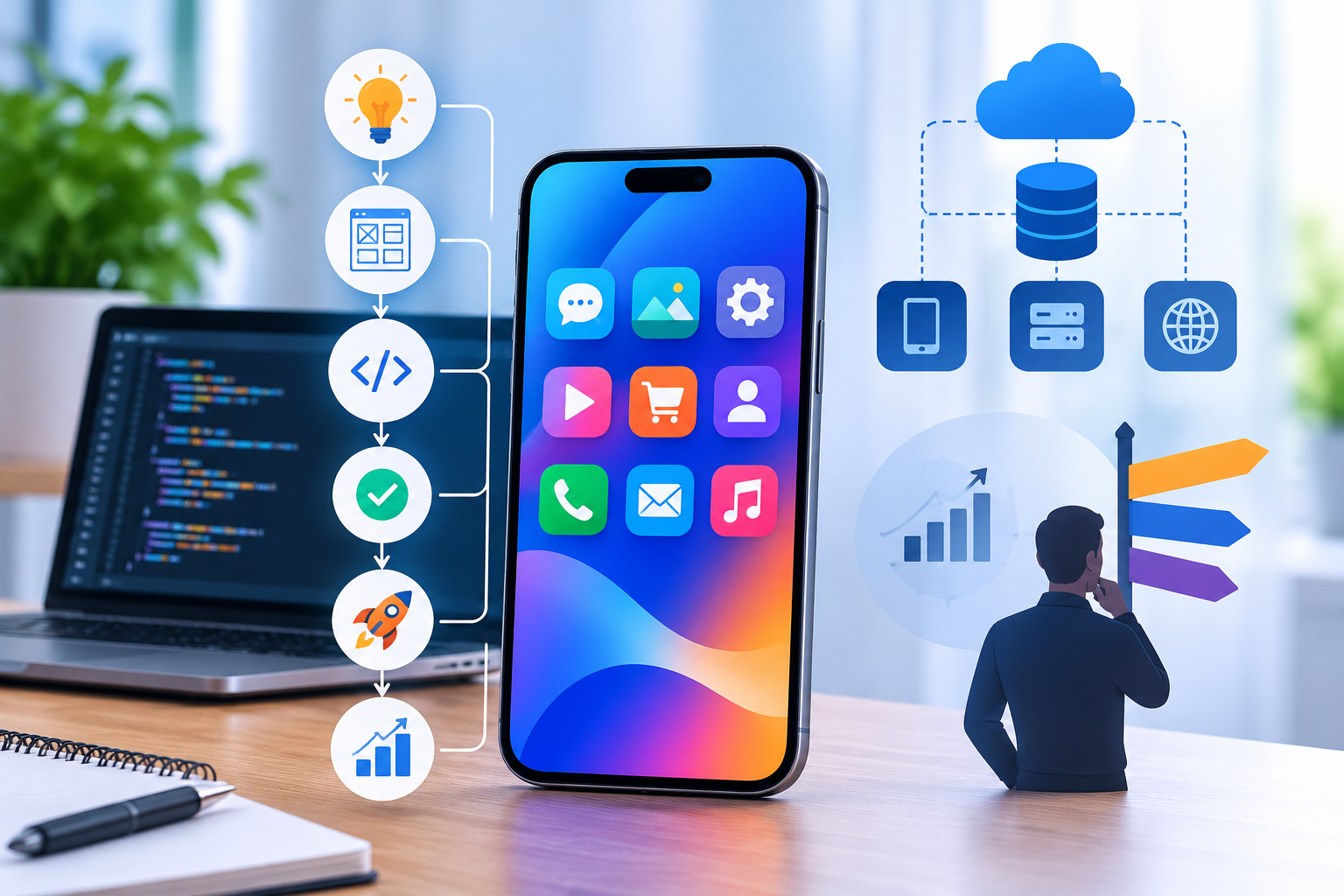

Mobile app development has become an essential part of modern business growth. From startups launching digital products to established enterprises improving customer experiences, mobile applications help businesses connect with customers, automate operations, simplify transactions, and create new revenue opportunities.
However, building a successful mobile application involves much more than writing code or designing attractive screens. It requires a well-defined development strategy, the right technology stack, scalable architecture, effective security measures, and continuous performance optimization.
A poorly planned application may work perfectly during its initial launch but struggle when user traffic increases, new features are introduced, or multiple systems need to communicate with one another. This is why businesses must approach mobile app development as a long-term technology investment rather than a one-time software project.
In this comprehensive guide, AResourcePool explores the complete mobile app development process, different development approaches, architectural patterns, technology decisions, estimated development timelines, security considerations, and strategies for building scalable mobile applications.
Whether you are a startup founder, business owner, product manager, or enterprise decision-maker, this guide will help you understand how to plan and develop a mobile application that supports your business objectives.
Key Takeaways
- Mobile app development begins with business planning, user research, and clearly defined product requirements.
- Choosing between native, cross-platform, hybrid, and progressive web applications depends on performance, budget, and business requirements.
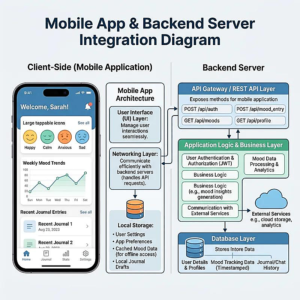
- A scalable architecture connects the frontend, backend, databases, APIs, and cloud infrastructure.
- Technology decisions made during the planning stage influence application performance, maintenance costs, and future scalability.
- Security, testing, and compliance must be considered throughout the development lifecycle.
- App deployment is only the beginning; continuous monitoring, updates, and optimization are essential for long-term success.
- Selecting an experienced mobile app development partner can help businesses reduce technical risks and accelerate product delivery.
Table of Contents
- What Is Mobile App Development?
- Why Mobile App Development Matters for Businesses
- Types of Mobile App Development
- The Complete Mobile App Development Process
- Understanding Mobile App Architecture
- Choosing the Right Technology Stack
- Native vs. Cross-Platform App Development
- Mobile App Development Cost and Timeline
- Mobile Application Security and Compliance
- Common Mobile App Development Challenges
- Mobile App Development Best Practices
- Future Trends in Mobile App Development
- How to Choose the Right Mobile App Development Partner
- How AResourcePool Helps Businesses Build Mobile Applications
- Frequently Asked Questions
1. What Is Mobile App Development?
Mobile app development is the process of planning, designing, building, testing, deploying, and maintaining software applications that run on mobile devices such as smartphones and tablets.
These applications are designed to perform specific tasks, provide digital services, improve customer interactions, or support internal business operations.
A mobile application typically consists of several interconnected components:
- Frontend: The visual interface through which users interact with the application.
- Backend: The server-side environment responsible for business logic, authentication, and data processing.
- Database: The system that stores and manages application information.
- APIs: Communication interfaces that allow different software components to exchange data.
- Cloud infrastructure: Hosting and computing resources that support application availability and scalability.
- Security systems: Authentication, authorization, encryption, and other protective mechanisms.
For example, consider an eCommerce mobile application. Customers browse products, add items to their shopping carts, complete payments, and track deliveries through the frontend. Meanwhile, the backend manages product information, inventory, customer accounts, payment requests, and order processing.
All these components work together to deliver a seamless application experience.
Why Is Mobile App Development More Than Coding?
A successful application must solve an actual problem. Developers must understand the target audience, business requirements, technical limitations, and expected application usage before selecting technologies or writing code.
For example:
- A banking application requires strong authentication and transaction security.
- A healthcare application needs secure patient information management.
- A logistics application may require GPS tracking and offline functionality.
- An eCommerce application needs reliable payment processing and inventory synchronization.
Therefore, mobile app development combines business strategy, product design, software engineering, and ongoing optimization.
2. Why Mobile App Development Matters for Businesses
Mobile applications have changed how businesses communicate with customers and manage everyday operations. Instead of depending entirely on physical interactions or traditional websites, organizations can provide services directly through mobile devices.
Here are some important business advantages.
2.1 Improved Customer Engagement
Mobile applications create a direct communication channel between businesses and customers.
Features such as personalized notifications, in-app messaging, loyalty programs, and user accounts encourage customers to interact with a business more frequently.
For example, an online retail company can send personalized product recommendations based on customer preferences and previous purchases.
2.2 Better Business Process Automation
Businesses often spend significant time managing repetitive administrative tasks.
Custom mobile applications can automate activities such as:
- Employee attendance tracking.
- Inventory management.
- Customer relationship management.
- Order processing.
- Delivery tracking.
- Appointment scheduling.
- Internal approval workflows.
Automation reduces manual effort, improves operational visibility, and helps employees focus on more valuable responsibilities.
2.3 Increased Revenue Opportunities
Mobile applications provide additional channels through which businesses can generate revenue.
Depending on the business model, applications can support:
- Direct product sales.
- Subscription-based services.
- In-app purchases.
- Premium memberships.
- Digital bookings.
- Service-based transactions.
An effective mobile application can also improve customer retention by making products and services easier to access.
2.4 Competitive Business Advantage
A well-developed mobile application can help businesses differentiate themselves through better digital experiences, faster service delivery, and personalized functionality.
For example, a logistics company offering real-time shipment tracking may provide greater transparency than competitors relying on manual status updates.
2.5 Access to Business Data and Insights
Mobile applications generate useful information about user behavior, transactions, preferences, and feature engagement.
Businesses can analyze this information to understand:
- Which features customers use most frequently.
- Where users abandon important workflows.
- Which products generate more interest.
- How customers interact with different services.
- Where application performance needs improvement.
These insights support more informed business decisions.
3. Types of Mobile App Development
Before starting development, businesses must decide which type of mobile application best supports their requirements.
Different development approaches offer different advantages in terms of performance, development speed, platform compatibility, and maintenance.
3.1 Native Mobile App Development
Native applications are developed specifically for an operating system.
For iOS, developers commonly use Swift, while Kotlin is a primary language for modern Android development.
Native applications provide direct access to platform-specific capabilities, including cameras, GPS, biometric authentication, notifications, and other device features.
Advantages:
- Strong platform-specific performance.
- Smooth user experience.
- Better integration with device hardware.
- Access to native operating system features.
- Greater control over platform-specific functionality.
Limitations:
- Separate development efforts may be required for iOS and Android.
- Maintenance can involve multiple codebases.
- Initial development costs may be higher.
Best For: Banking applications, advanced gaming products, high-performance applications, and software requiring extensive device integration.
3.2 Cross-Platform App Development
Cross-platform development allows developers to create applications for multiple operating systems using a shared codebase.
Popular technologies include Flutter and React Native.
Instead of building completely separate applications, developers can reuse significant portions of the application code while adapting platform-specific functionality where required.
Advantages:
- Code reuse across platforms.
- Faster development cycles.
- Reduced duplication of development work.
- More consistent user experiences.
- Simplified maintenance for shared functionality.
Limitations:
- Certain advanced features may require native modules.
- Platform-specific testing is still necessary.
- Performance depends on application complexity and implementation.
Best For: Startups, eCommerce platforms, business applications, service marketplaces, and products targeting both Android and iOS users.
3.3 Hybrid Mobile App Development
Hybrid applications combine web technologies with a native application container.
They commonly use technologies such as HTML, CSS, and JavaScript, supported by frameworks and native plugins.
Hybrid development can be suitable for applications that do not require extensive native functionality.
Advantages:
- Reuse of web development skills.
- Faster development for relatively simple applications.
- Shared code across supported platforms.
Limitations:
- Advanced device integration can be more complicated.
- Performance may vary depending on the application.
- Native platform behavior may require additional customization.
Best For: Internal business tools, simple service applications, and applications with relatively straightforward functionality.
3.4 Progressive Web Applications (PWAs)
Progressive Web Applications are web applications designed to provide an app-like experience through a browser.
They can offer features such as installability, responsive layouts, and selected offline capabilities.
Advantages:
- Access through a web browser.
- No traditional app store installation required.
- A shared web application codebase.
- Easier distribution through a URL.
Limitations:
- Device feature support varies across platforms and browsers.
- Some advanced native capabilities may be unavailable.
- Browser-related limitations can affect functionality.
Best For: Content platforms, customer portals, lightweight business applications, and digital services that prioritize easy access.
Comparison of Mobile App Development Types
| Comparison Factor | Native App | Cross-Platform App | Hybrid App | PWA |
|---|---|---|---|---|
| Development | Platform-specific | Shared codebase | Web technologies | Web technologies |
| Performance | Generally excellent | Generally strong | Depends on implementation | Browser-dependent |
| Development Cost | Often higher | Often moderate | Often lower for simple apps | Often lower |
| Device Access | Extensive | Good with platform integration | Plugin-dependent | Browser-dependent |
| Offline Support | Yes | Yes, when implemented | Possible | Possible |
| Maintenance | Platform-specific | Shared codebase | Shared codebase | Shared codebase |
| Best Use Case | Complex applications | Multi-platform products | Simple business tools | Web-first experiences |
Strategic Insight: There is no universally best development approach. Businesses should select the approach according to their product requirements, user expectations, technical complexity, and long-term maintenance plans.
4. The Complete Mobile App Development Process
Mobile application development involves multiple stages. Each stage contributes to application quality, technical stability, and long-term business value.
A structured development process helps organizations reduce uncertainty, manage project resources, and identify potential issues before they become expensive problems.
Step 1: Business Strategy and Idea Validation
The first stage is understanding why the application needs to exist.
Before development begins, businesses should identify the problem they want to solve and the value the application will deliver.
Important questions include:
- Who will use the application?
- What problem will it solve?
- What makes the application different?
- What business objectives should it support?
- How will success be measured?
For example, a food delivery startup may want to simplify restaurant discovery, online ordering, digital payments, and delivery tracking.
Instead of immediately building every possible feature, the business should identify the most important user requirements.
Important activities:
- Business requirement analysis.
- Market research.
- Competitor analysis.
- Target audience identification.
- Revenue model planning.
- Project feasibility assessment.
Step 2: Market Research and Competitor Analysis
Market research helps businesses understand customer expectations and identify opportunities.
Analyze competing applications to understand their features, navigation patterns, pricing models, strengths, and limitations.
Consider examining:
- User onboarding.
- Registration and login processes.
- Navigation structure.
- Payment experience.
- Customer support functionality.
- Reviews and ratings.
- Application performance.
Competitor analysis should not focus only on copying existing features. The objective is to identify what customers need and where current solutions fall short.
For example, if competing applications have complicated registration processes, a simpler onboarding experience could become an important product advantage.
Step 3: Requirement Gathering and Feature Planning
After validating the idea, the next step is defining the application requirements.
Requirements should be divided into two main categories.
Functional Requirements
These describe what the application should do.
Examples include:
- User registration and login.
- User profile management.
- Product browsing.
- Online payments.
- Push notifications.
- Search and filtering.
- Order management.
- Admin dashboard.
Non-Functional Requirements
These describe how the application should perform.
Examples include:
- Application response time.
- Scalability.
- Security.
- Reliability.
- Availability.
- Accessibility.
- Maintainability.
- Device compatibility.
MVP vs. Full-Feature Application
A Minimum Viable Product (MVP) includes the essential functionality needed to validate a product idea with real users.
| Feature Category | MVP Version | Advanced Version |
|---|---|---|
| Authentication | Email or phone login | Social login and MFA |
| User Profile | Basic information | Personalized preferences |
| Payments | Essential payment integration | Multiple payment methods |
| Notifications | Basic alerts | Personalized notifications |
| Analytics | Basic usage tracking | Advanced behavioral analytics |
| Admin Panel | Essential management | Advanced reporting and automation |
| Support | Contact form | Chat and intelligent support |
Starting with an MVP allows businesses to gather feedback before investing in extensive functionality.
Step 4: UI/UX Design and Prototyping
User experience is one of the most important factors influencing application adoption.
Even technically advanced applications can struggle if users find them confusing or difficult to navigate.
The UI/UX design process generally includes:
User Research: Understand the expectations, needs, and behavior of target users.
Information Architecture: Organize content, screens, and navigation logically.
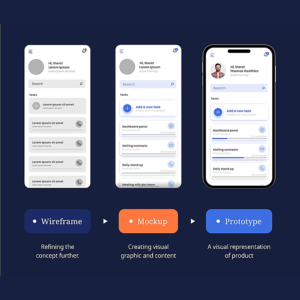
Wireframing: Create basic layouts that define screen structure and functionality.
Visual Design: Develop colors, typography, icons, buttons, and other interface elements.
Prototyping: Build interactive models to demonstrate how users move between screens.
Usability Testing: Collect feedback and improve confusing interactions.
A good mobile interface should be intuitive, responsive, accessible, and consistent across supported devices.
Step 5: Technology Stack and Architecture Planning
Technology selection determines how the application will be developed, deployed, maintained, and scaled.
The development team should evaluate:
- Supported mobile platforms.
- Backend requirements.
- Database requirements.
- API integrations.
- Hosting infrastructure.
- Authentication mechanisms.
- Security requirements.
- Expected user traffic.
For example, a basic business application may work efficiently with a modular monolithic backend, while a large platform with independently scaling business services may eventually benefit from microservices.
The important point is to select technology according to actual requirements rather than choosing tools simply because they are popular.
Step 6: Frontend and Backend Development
Once the architecture and designs are approved, developers begin building the application.
Frontend Development
Frontend developers create the screens and interactions users experience.
Their responsibilities include:
- Implementing approved designs.
- Building navigation systems.
- Integrating APIs.
- Managing application state.
- Handling user inputs.
- Implementing device-specific functionality.
Backend Development
Backend developers build the server-side systems responsible for application operations.
Their responsibilities include:
- Business logic development.
- Database design.
- API development.
- Authentication and authorization.
- Payment integration.
- Data processing.
- Third-party service integration.
Both development areas must work together to ensure that application screens communicate correctly with backend services.
Step 7: Testing and Quality Assurance
Testing helps identify problems before the application reaches customers.
A complete quality assurance process should cover multiple testing categories.
| Testing Type | Purpose |
|---|---|
| Functional Testing | Verifies that application features work correctly |
| UI Testing | Checks visual consistency and interface behavior |
| Usability Testing | Evaluates user experience and navigation |
| Performance Testing | Measures responsiveness and stability |
| Security Testing | Identifies security weaknesses |
| Compatibility Testing | Checks different devices and operating systems |
| Integration Testing | Validates communication between systems |
| Regression Testing | Ensures new updates do not break existing features |
| User Acceptance Testing | Confirms that business requirements are satisfied |
Testing should cover real-world conditions, including poor network connectivity, different screen sizes, interrupted sessions, and unexpected user inputs.
Step 8: App Deployment and Launch
After development and testing are complete, the application is prepared for release.
For public applications, developers typically prepare the required submission materials for:
- Apple App Store.
- Google Play Store.
Deployment activities may include:
- Production environment configuration.
- App signing and release builds.
- Store listing preparation.
- Screenshots and application descriptions.
- Privacy policy and permission disclosures.
- Final quality checks.
- Production database setup.
- Release monitoring.
App store approval requirements and timelines vary, so launch planning should account for review and potential revision requests.
Step 9: Maintenance and Continuous Improvement
Application development does not end when the app is published.
Operating systems change, devices evolve, user expectations grow, and security requirements need continuous attention.
Post-launch activities include:
- Bug fixes.
- Performance monitoring.
- Security updates.
- OS compatibility updates.
- Feature improvements.
- Database optimization.
- User feedback analysis.
- Analytics monitoring.
A long-term maintenance strategy ensures that the application remains useful, secure, and technically reliable.
Mobile App Development Lifecycle at a Glance
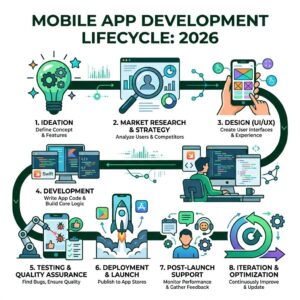
| Development Stage | Main Deliverable |
|---|---|
| Strategy | Business objectives and project scope |
| Research | Market and user insights |
| Requirements | Functional and non-functional specifications |
| UI/UX | Wireframes and interactive prototypes |
| Architecture | Technical design and technology stack |
| Development | Working frontend and backend |
| Testing | Validated application |
| Deployment | Published application |
| Maintenance | Optimized and updated product |
5. Understanding Mobile App Architecture
Mobile app architecture describes the structural organization of an application and the way its different components communicate.
It determines how the frontend interacts with the backend, where information is stored, how external services are connected, and how the system handles increasing demand.
A well-designed architecture improves maintainability, performance, security, and scalability.
5.1 Presentation Layer
The presentation layer is the user-facing part of the application.
It includes:
- Screens and layouts.
- Navigation.
- User input controls.
- UI components.
- Visual feedback.
- Application state presentation.
The primary objective is to provide a consistent and user-friendly experience.
5.2 Business Logic Layer
This layer handles the application’s operational rules.
For example, in an eCommerce application, business logic determines:
- Whether a product is available.
- How discounts are calculated.
- Whether an order can be placed.
- How payment status is verified.
- How order information is updated.
Keeping business logic separate from the user interface makes applications easier to maintain and test.
5.3 Data Access Layer
The data access layer manages communication between application logic and data sources.
It may handle:
- Database queries.
- Local storage.
- Remote API communication.
- Data synchronization.
- Caching.
- Data transformation.
This separation helps developers modify data sources without unnecessarily changing the entire application.
5.4 Backend and API Layer
The backend manages server-side functionality and provides services to the mobile application.
APIs allow the frontend to request information and perform actions.
For example:
- A customer opens an application.
- The application sends a request to the backend.
- The backend validates the request.
- The database returns the required information.
- The backend processes the response.
- The application displays the information.
5.5 Database Layer
The database stores application information, such as:
- Customer profiles.
- Product details.
- Transaction records.
- Application settings.
- User preferences.
- Order information.
Common database choices include PostgreSQL, MySQL, MongoDB, and SQLite, depending on the data structure and application requirements.
5.6 Cloud and Infrastructure Layer
Cloud infrastructure provides computing resources, storage, networking, and hosting services.
Cloud environments can help businesses:
- Scale resources as demand changes.
- Improve application availability.
- Deploy updates efficiently.
- Manage backups.
- Monitor application performance.
Mobile App Architecture Diagram
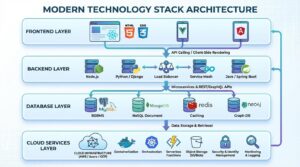
text
             MOBILE APPLICATION
                      |
             PRESENTATION LAYER
           (iOS / Android / Flutter)
                      |
              BUSINESS LOGIC
           (Application Workflows)
                      |
              API COMMUNICATION
              (REST / GraphQL)
                      |
               BACKEND SERVICES
          (Authentication / Payments)
                      |
               DATA ACCESS LAYER
                      |
                   DATABASE
              (SQL / NoSQL)
                      |
              CLOUD INFRASTRUCTURE
            (Hosting / Storage / CDN)
5.7 Common Mobile App Architectural Patterns
Different architectural patterns help developers organize code and manage application complexity.
| Architecture Pattern | Description | Suitable For |
|---|---|---|
| MVC | Separates model, view, and controller responsibilities | Structured applications |
| MVP | Uses a presenter to coordinate UI and business logic | Applications needing testable presentation logic |
| MVVM | Separates UI from presentation logic through view models | Modern iOS and Android applications |
| Clean Architecture | Organizes code around independent business rules | Complex and maintainable applications |
| Monolithic Architecture | Deploys backend functionality as one application | Small and medium-sized systems |
| Microservices | Separates backend capabilities into independently deployable services | Large and complex platforms |
Monolithic vs. Microservices Architecture
A monolithic architecture keeps application backend functionality within a single deployable unit.
A microservices architecture divides backend functionality into smaller services that communicate through defined interfaces.
| Factor | Monolithic | Microservices |
|---|---|---|
| Structure | Single deployable application | Multiple independent services |
| Initial Complexity | Lower | Higher |
| Deployment | Usually unified | Services can deploy independently |
| Scaling | Often scales the application as a whole | Services can scale independently |
| Maintenance | Simpler initially | Requires service coordination |
| Best For | Smaller or moderately complex systems | Large systems with distinct scaling needs |
Strategic Recommendation: Businesses should avoid adopting microservices simply because they are considered modern. A modular monolith is often a practical starting point. Microservices become valuable when independent scaling, deployment, or team ownership justifies their additional operational complexity.
6. Choosing the Right Technology Stack
The technology stack is the combination of programming languages, frameworks, databases, development tools, and infrastructure used to build an application.
The right technology stack depends on application requirements, development expertise, performance expectations, and future expansion plans.
Recommended Mobile App Development Technologies
| Technology Category | Popular Technologies | Primary Purpose |
|---|---|---|
| iOS Development | Swift, SwiftUI | Native iOS applications |
| Android Development | Kotlin, Jetpack Compose | Native Android applications |
| Cross-Platform | Flutter, React Native | Multi-platform development |
| Backend | Node.js, Java, Python, .NET, PHP | Server-side functionality |
| Database | PostgreSQL, MySQL, MongoDB | Data management |
| API | REST, GraphQL | System communication |
| Cloud | AWS, Microsoft Azure, Google Cloud | Hosting and infrastructure |
| Containerization | Docker | Application packaging |
| Orchestration | Kubernetes | Container management |
| Monitoring | Sentry and cloud monitoring tools | Performance and error tracking |
How to Select the Right Stack
Before selecting technologies, evaluate the following factors:
1. Application Complexity: A simple appointment-booking app has different requirements from a real-time financial application.
2. Platform Requirements: Determine whether you need iOS, Android, or both.
3. Performance Requirements: Applications with intensive graphics, real-time processing, or complex device integration may benefit from native development.
4. Development Budget: Consider initial implementation as well as future maintenance costs.
5. Scalability: Evaluate whether the application will need to support increasing users, transactions, and integrations.
6. Developer Expertise: Select technologies that your development team can implement and maintain effectively.
7. Third-Party Integration: Verify compatibility with payment providers, analytics tools, CRM systems, and other external platforms.
7. Native vs. Cross-Platform App Development: Which Is Better?
One of the most important strategic decisions is choosing between native and cross-platform development.
Both approaches can produce successful mobile applications, but their suitability depends on the product.
When Should You Choose Native Development?
Native development is a strong choice when:
- Your application requires advanced device hardware integration.
- Performance is a major business requirement.
- You need platform-specific functionality.
- Your product includes complex animations or graphics.
- You have sufficient resources to maintain separate platform implementations.
When Should You Choose Cross-Platform Development?
Cross-platform development may be appropriate when:
- You want to target Android and iOS simultaneously.
- Your application uses common business functionality.
- Faster development is a priority.
- You want to reduce duplicated implementation.
- You need a shared codebase for long-term maintenance.
Decision Matrix
| Business Requirement | Recommended Approach |
|---|---|
| High-performance mobile gaming | Native |
| Standard eCommerce application | Cross-platform |
| Business management application | Cross-platform |
| Advanced device integration | Native or hybrid native modules |
| Startup MVP | Often cross-platform |
| Simple browser-based customer portal | PWA |
| Platform-specific financial application | Often native |
The final decision should be based on the application’s technical and business requirements rather than development trends alone.
8. Mobile App Development Cost and Timeline
Mobile app development costs depend on multiple factors, including application complexity, features, platform requirements, integrations, design, infrastructure, and testing.
There is no universal price for developing a mobile application.
A basic application with limited functionality requires fewer development resources than a large enterprise platform with complex integrations and advanced security requirements.
Factors That Influence Development Costs
1. Application Complexity
Simple applications typically have fewer screens, integrations, and workflows. Advanced applications may require complex business logic, real-time communication, and custom infrastructure.
2. Platform Selection
Developing separate native applications for iOS and Android may require more implementation effort than using a shared cross-platform codebase.
3. UI/UX Design
Custom interfaces, animations, accessibility requirements, and extensive prototyping influence design costs.
4. Backend Development
Applications requiring complex APIs, databases, user management, and administrative functionality require additional engineering resources.
5. Third-Party Integrations
Payment gateways, mapping services, analytics platforms, CRM systems, and external APIs add implementation and testing effort.
6. Security Requirements
Sensitive business applications may require additional authentication, encryption, auditing, compliance reviews, and security testing.
Estimated Mobile App Development Timeline
The following timeline is an illustrative planning estimate, not a fixed delivery commitment.
| Development Phase | Estimated Duration |
|---|---|
| Research and Planning | 1–2 Weeks |
| Requirement Analysis | 1–2 Weeks |
| UI/UX Design | 2–4 Weeks |
| Architecture Planning | 1–2 Weeks |
| Frontend and Backend Development | 4–12 Weeks |
| Testing and Quality Assurance | 2–4 Weeks |
| Deployment and Launch | 1–2 Weeks |
| Total Indicative Duration | 12–28 Weeks |
Some activities can run in parallel. Complex enterprise applications may take considerably longer.
Illustrative Mobile App Development Cost Ranges
The following figures are broad planning examples in USD. Actual quotations depend on scope, location, team composition, integrations, and delivery requirements.
| Application Type | Illustrative Cost Range |
|---|---|
| Basic Mobile App | $5,000–$15,000 |
| Medium-Complexity App | $15,000–$50,000 |
| Advanced Mobile App | $50,000–$120,000 |
| Enterprise-Level App | $120,000+ |
These are not AResourcePool quotations or guaranteed market prices. A project-specific estimate should be prepared after requirements and technical scope have been reviewed.
Mobile App Development Cost Distribution
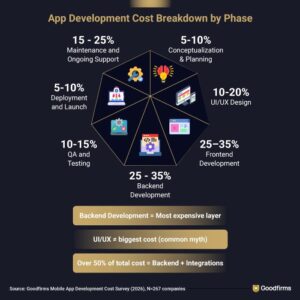
The following chart shows an example of how a project budget might be distributed. These percentages are illustrative and should not be presented as universal industry benchmarks.
text
UI/UX Design          15%  ███████████████
Frontend Development  25%  █████████████████████████
Backend Development   25%  █████████████████████████
Testing & QA          15%  ███████████████
Project Management    10%  ██████████
Deployment             5%  █████
Other Costs            5%  █████
Chart Caption: Illustrative distribution of a mobile app development project budget.
Additional Costs Businesses Should Consider
Development is only one part of the total cost of ownership.
Other expenses may include:
- Cloud hosting.
- Database management.
- App store accounts.
- Third-party API subscriptions.
- Security audits.
- Technical support.
- Application updates.
- Monitoring tools.
- Ongoing maintenance.
Planning these expenses in advance helps businesses avoid unexpected costs after launch.
9. Mobile Application Security and Compliance
Security is a fundamental requirement for modern mobile applications.
Applications often process personal information, financial details, business records, and other sensitive data. A security failure can affect customer trust, business operations, and legal obligations.
Security should therefore be integrated into every stage of development.
Important Mobile Application Security Practices
Secure Authentication
Implement reliable authentication methods, including secure password handling, multi-factor authentication where appropriate, and controlled session management.
Data Encryption
Sensitive information should be protected during transmission and, where appropriate, while stored.
Secure API Communication
APIs should use secure communication protocols, validate requests, and enforce appropriate authorization checks.
Role-Based Access Control
Users should only access information and operations relevant to their assigned permissions.
Secure Data Storage
Avoid storing sensitive information unnecessarily on mobile devices. Protect required local data using platform-supported security mechanisms.
Regular Security Testing
Perform code reviews, dependency checks, security assessments, and appropriate penetration testing.
Backup and Recovery
Create reliable backup strategies and define recovery procedures for critical application data.
Compliance Considerations
Depending on the application’s industry, location, and data processing activities, businesses may need to consider:
- GDPR for applicable personal data processing.
- Applicable Indian data protection requirements, including the Digital Personal Data Protection Act and relevant rules.
- HIPAA requirements where applicable to covered healthcare entities and their business associates.
- PCI DSS requirements for organizations handling payment card data.
Compliance obligations depend on the specific business model and jurisdiction. A technical implementation alone does not automatically make an application compliant.
10. Common Mobile App Development Challenges
Even well-planned projects can encounter technical and operational challenges.
Understanding these issues early helps development teams prepare effective solutions.
10.1 Unclear Project Requirements
Changing requirements during development can create delays, additional costs, and unnecessary rework.
Solution: Prepare a detailed scope document, prioritize features, and establish a formal process for approving changes.
10.2 Device and OS Fragmentation
Android and iOS devices differ in screen sizes, hardware capabilities, operating system versions, and performance characteristics.
Solution: Define a device compatibility strategy and test across representative devices and supported operating system versions.
10.3 Performance Issues
Applications may become slow because of inefficient code, excessive network requests, poor database queries, or unoptimized images.
Solution: Implement performance monitoring, efficient caching, optimized APIs, and regular load testing.
10.4 Third-Party Integration Problems
External services can introduce inconsistent responses, downtime, API changes, and authentication problems.
Solution: Use clear integration contracts, proper error handling, monitoring, and fallback strategies.
10.5 Security Vulnerabilities
Poor authentication, excessive permissions, weak data handling, and insecure APIs can expose sensitive information.
Solution: Follow secure development practices and perform regular security assessments.
10.6 Scalability Limitations
An application designed only for a small initial user base may struggle when usage increases.
Solution: Plan for expected growth, monitor system performance, and adopt appropriate cloud infrastructure and architectural patterns.
10.7 Poor User Experience
Complicated navigation, confusing registration, and slow interactions can reduce engagement.
Solution: Conduct usability testing, analyze user feedback, and continuously improve important user journeys.
Common Challenges and Their Solutions
| Challenge | Business Impact | Recommended Solution |
|---|---|---|
| Unclear requirements | Delays and increased costs | Detailed planning |
| Poor performance | Reduced user satisfaction | Performance optimization |
| Security weaknesses | Data exposure and operational risk | Secure development |
| Integration failures | Interrupted workflows | API validation and monitoring |
| Device fragmentation | Inconsistent user experience | Compatibility testing |
| Poor scalability | Service interruptions | Scalable infrastructure |
| Weak UX design | Lower engagement | User-centered design |
11. Mobile App Development Best Practices
Building an application is not only about completing features. It is about creating a product that remains reliable and maintainable as business requirements evolve.
The following practices help improve development quality.
11.1 Follow a User-Centered Development Approach
Understand user requirements before finalizing application workflows.
Conduct user interviews, usability tests, and feedback sessions to identify areas where the experience can improve.
11.2 Use Modular and Maintainable Code
Organize application components into clear modules.
Modular code improves readability, simplifies testing, and allows teams to update functionality without unnecessarily affecting unrelated components.
11.3 Prioritize Application Performance
Optimize images, network requests, database operations, and background tasks.
Monitor real application performance rather than relying only on development environment results.
11.4 Build Security Into the Development Lifecycle
Security should be considered during architecture design, coding, integration, testing, and deployment.
Avoid treating security as a final checklist item.
11.5 Automate Testing and Deployment
Use appropriate automated testing and CI/CD workflows to improve release consistency.
Automated pipelines can reduce repetitive work and help identify problems earlier.
11.6 Monitor Application Analytics
Track meaningful indicators such as:
- Daily and monthly active users.
- User retention.
- Conversion rates.
- Crash-free sessions.
- API response times.
- Feature adoption.
- User journey completion.
These indicators help product teams identify opportunities for improvement.
11.7 Plan for Continuous Maintenance
Maintain a product roadmap that includes bug fixes, security improvements, operating system updates, and new feature releases.
11.8 Design for Accessibility
Use readable typography, sufficient color contrast, accessible controls, and logical navigation.
Accessibility improvements help make applications usable by a wider audience.
12. Future Trends in Mobile App Development
Mobile application development continues to evolve as businesses adopt new technologies and users expect more intelligent and personalized digital experiences.
Several developments are influencing modern application strategies.
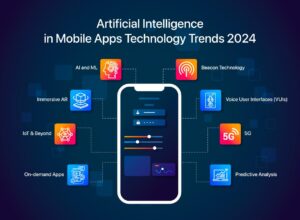
12.1 Artificial Intelligence Integration
AI-powered features can improve mobile applications through:
- Intelligent recommendations.
- Conversational customer support.
- Predictive analytics.
- Automated document processing.
- Personalized user experiences.
- Intelligent search.
For example, an eCommerce application can use recommendation systems to suggest products based on user preferences and browsing behavior.
12.2 Machine Learning and Predictive Analytics
Machine learning helps applications analyze patterns and make predictions using available data.
Potential applications include fraud detection, demand forecasting, personalized recommendations, and customer behavior analysis.
12.3 Internet of Things (IoT)
IoT integration allows mobile applications to interact with connected devices.
Examples include:
- Smart home applications.
- Wearable health devices.
- Industrial monitoring systems.
- Connected vehicles.
- Smart energy management.
12.4 Augmented Reality and Virtual Reality
AR and VR can create interactive digital experiences.
Retailers can use AR for product visualization, while real estate businesses can provide virtual property tours.
12.5 Cloud-Native Application Development
Cloud-native technologies support flexible infrastructure, managed services, automated deployments, and scalable application environments.
Businesses can use these capabilities to improve application availability and manage changing workloads.
12.6 5G and Real-Time Experiences
As 5G connectivity expands, applications can take advantage of improved network capabilities for supported real-time experiences, connected devices, and high-bandwidth services.
12.7 Privacy-Focused Development
Users and regulators increasingly expect responsible data collection and transparent privacy practices.
Applications should collect only necessary information, provide clear privacy disclosures, and implement appropriate data protection controls.
Future Technology Opportunities
| Technology | Potential Mobile App Application | Business Benefit |
|---|---|---|
| Artificial Intelligence | Personalized assistance | Better user engagement |
| Machine Learning | Predictive recommendations | Improved decisions |
| IoT | Connected device management | Operational efficiency |
| AR/VR | Virtual product experiences | Customer interaction |
| Cloud Computing | Scalable application infrastructure | Flexible growth |
| 5G | Real-time connected services | Improved connectivity |
| Automation | Workflow automation | Reduced manual work |
13. How to Choose the Right Mobile App Development Partner
Selecting a mobile app development company is an important decision because the development partner can influence project quality, delivery timelines, technical architecture, and long-term maintenance.
Before choosing a development company, consider the following factors.
13.1 Technical Expertise
Evaluate whether the development team has experience with the technologies required for your application.
Relevant expertise may include:
- iOS development.
- Android development.
- Flutter development.
- React Native development.
- Backend engineering.
- API integration.
- Cloud infrastructure.
- Database management.
13.2 Portfolio and Previous Experience
Review previous projects to understand the company’s development capabilities.
Look for applications that demonstrate relevant functionality, industry experience, and technical complexity.
13.3 Development Process
A reliable development partner should have a structured process for:
- Requirement gathering.
- Project planning.
- UI/UX design.
- Development.
- Testing.
- Deployment.
- Maintenance.
13.4 Communication and Transparency
Clear communication helps businesses understand project progress, identify risks, and make informed decisions.
Ask about reporting frequency, project management tools, milestone tracking, and feedback procedures.
13.5 Scalability and Long-Term Support
Your application may need additional features, integrations, and infrastructure as your business grows.
Choose a partner who can support future development rather than focusing only on the initial launch.
Mobile App Development Partner Evaluation Checklist
| Evaluation Criteria | What to Check |
|---|---|
| Technical Skills | Experience with relevant platforms and frameworks |
| Portfolio | Similar projects and demonstrated capabilities |
| UI/UX Expertise | Design and usability process |
| QA Process | Testing strategy and release validation |
| Security | Secure development practices |
| Communication | Reporting and project coordination |
| Maintenance | Post-launch support |
| Pricing | Clear scope and transparent estimates |
14. How AResourcePool Helps Businesses Build Mobile Applications
Choosing the right technology partner can make a significant difference in how efficiently an application moves from an idea to a working digital product.
AResourcePool works with businesses to develop technology solutions that support their operational and digital transformation goals.
With experience in software development, mobile technologies, modern frameworks, and emerging technologies, AResourcePool offers development capabilities for businesses looking to create scalable digital applications.
Our Mobile App Development Capabilities
Build applications for Apple’s ecosystem with platform-focused development and user experience considerations.
Develop Android applications designed to support different device requirements and business use cases.
Cross-Platform App Development
Use technologies such as Flutter and React Native to build applications for multiple platforms with a shared codebase where appropriate.
Create cross-platform mobile experiences using JavaScript and React Native technologies.
Swift App Development
Build native iOS applications using Swift.
Custom Application Development
Develop application solutions based on specific business workflows, customer requirements, and integration needs.
Our Technology Expertise
AResourcePool works with a range of modern technologies and development frameworks.
| Technology Area | Technologies |
|---|---|
| iOS | Swift, iOS |
| Android | Kotlin, Android |
| Cross-Platform | Flutter, React Native |
| Backend | Node.js, Java, PHP, Python, .NET |
| Frontend | React, Angular, Vue.js |
| Database | PostgreSQL, MySQL, MongoDB |
| Cloud | AWS, Azure, Google Cloud |
| Emerging Technologies | AI, Machine Learning, AR/VR, IoT |
Technology selection depends on the requirements of each project.
Why Consider AResourcePool?
- Business-Focused Solutions: Development aligned with actual business requirements.
- Modern Technology Expertise: Experience across mobile, web, cloud, and emerging technologies.
- Flexible Engagement Models: Project-based and team-based development arrangements.
- Scalable Development: Solutions designed with future business requirements in mind.
- Ongoing Collaboration: Support throughout planning, development, and improvement.
Whether you are planning a startup application, an eCommerce platform, a business management tool, or an enterprise mobile solution, the right development strategy can help transform your idea into a practical digital product.
Ready to Build Your Mobile Application?
Turn your application idea into a scalable digital solution with AResourcePool.
Discuss your requirements, define the right technology strategy, and explore a development approach that aligns with your business goals.
CTA: Explore AResourcePool Mobile App Development Services
Conclusion
Mobile app development is a strategic investment that requires careful planning, technical expertise, and a long-term product vision.
From validating an idea and selecting the right development approach to designing scalable architecture, implementing security, and maintaining application performance, every decision contributes to the final product.
Businesses should focus on building applications that solve real problems, deliver meaningful user experiences, and support future growth. Selecting the right technology stack and architecture at the beginning can also reduce unnecessary complexity and make future improvements easier.
Most importantly, successful mobile applications are not defined only by the features they launch with. Their long-term value comes from reliability, usability, security, and continuous improvement.
AResourcePool helps businesses explore modern application development approaches and build digital solutions aligned with their technology and business objectives.
If you are planning to develop a mobile application, start with a clear strategy, identify your essential features, and choose a development approach that supports your long-term goals.
Build smarter. Scale confidently. Create better digital experiences with AResourcePool.
